No description
 314c6d77aa
Implement full agent session frontend: SDK message adapter parsing stream-json into 9 typed message types, agent bridge for Tauri IPC, dispatcher routing sidecar events to store, agent session store with cost tracking, and AgentPane component with prompt input, message rendering (text, thinking, tool calls, results, cost), and stop button. Add Ctrl+Shift+N shortcut and sidebar agent button. |
||
|---|---|---|
| .claude | ||
| .vscode | ||
| docs | ||
| v2 | ||
| .gitignore | ||
| bterminal.py | ||
| bterminal.svg | ||
| CHANGELOG.md | ||
| ctx | ||
| install.sh | ||
| README.md | ||
| screenshot.png | ||
| TODO.md | ||


BTerminal
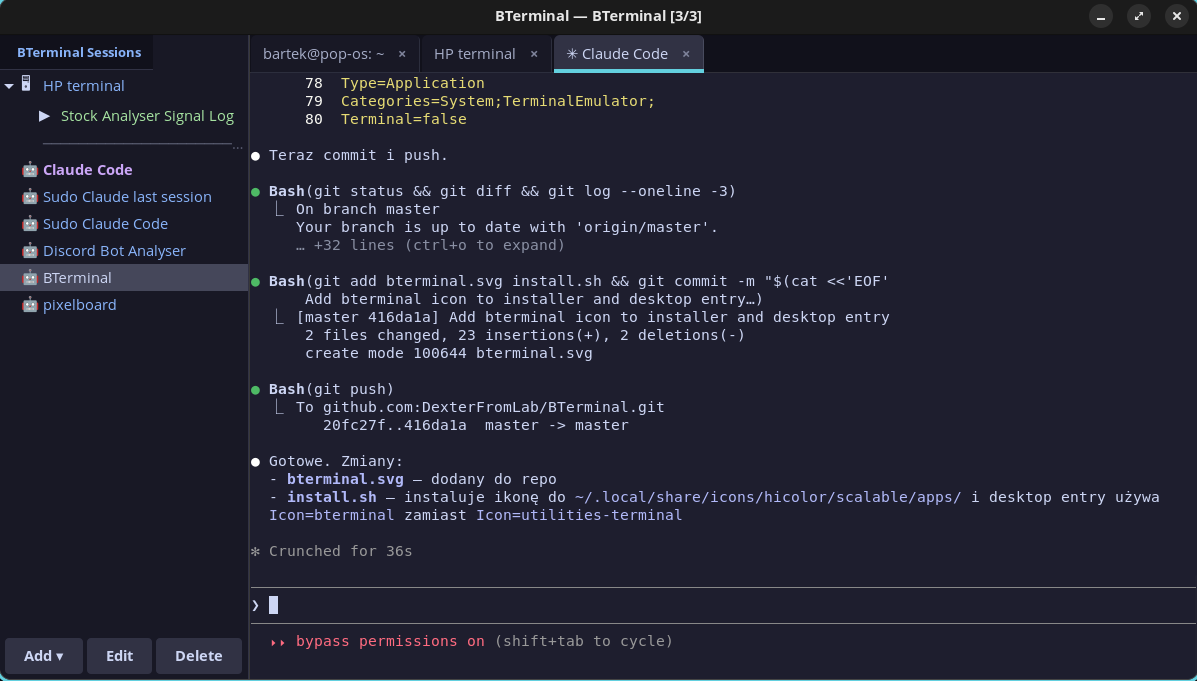
Terminal with session panel (MobaXterm-style), built with GTK 3 + VTE. Catppuccin Mocha theme.
v2 in progress (Phase 2 complete): Redesign as a multi-session Claude agent dashboard using Tauri 2.x + Svelte 5 + Claude Agent SDK. Working multi-pane terminal with PTY backend, CSS Grid tiling, and Catppuccin theme on branch
v2-mission-control. See docs/task_plan.md for architecture and docs/phases.md for implementation plan.
Features
- SSH sessions — saved configs (host, port, user, key, folder, color), CRUD with side panel
- Claude Code sessions — saved Claude Code configs with sudo, resume, skip-permissions and initial prompt
- SSH macros — multi-step macros (text, key, delay) assigned to sessions, run from sidebar
- Tabs — multiple terminals in tabs, Ctrl+T new, Ctrl+Shift+W close, Ctrl+PageUp/Down switch
- Sudo askpass — Claude Code with sudo: password entered once, temporary askpass helper, auto-cleanup
- Folder grouping — SSH and Claude Code sessions can be grouped in folders on the sidebar
- ctx — Context manager — SQLite-based cross-session context database for Claude Code projects
- Catppuccin Mocha — full theme: terminal, sidebar, tabs, session colors
Installation
git clone https://github.com/DexterFromLab/BTerminal.git
cd BTerminal
./install.sh
The installer will:
- Install system dependencies (python3-gi, GTK3, VTE)
- Copy files to
~/.local/share/bterminal/ - Create symlinks:
bterminalandctxin~/.local/bin/ - Initialize context database at
~/.claude-context/context.db - Add desktop entry to application menu
Manual dependency install (Debian/Ubuntu/Pop!_OS)
sudo apt install python3-gi gir1.2-gtk-3.0 gir1.2-vte-2.91
Usage
bterminal
Context Manager (ctx)
ctx is a SQLite-based tool for managing persistent context across Claude Code sessions.
ctx init myproject "Project description" /path/to/project
ctx get myproject                    # Load full context (shared + project)
ctx set myproject key "value"        # Save a context entry
ctx shared set preferences "value"   # Save shared context (available in all projects)
ctx summary myproject "What was done" # Save session summary
ctx search "query"                   # Full-text search across everything
ctx list                             # List all projects
ctx history myproject                # Show session history
ctx --help                           # All commands
Integration with Claude Code
Add a CLAUDE.md to your project root:
On session start, load context:
  ctx get myproject

Save important discoveries: ctx set myproject <key> <value>
Before ending session: ctx summary myproject "<what was done>"
Claude Code reads CLAUDE.md automatically and will maintain the context database.
Configuration
Config files in ~/.config/bterminal/:
| File | Description |
|---|---|
sessions.json |
Saved SSH sessions + macros |
claude_sessions.json |
Saved Claude Code configs |
Context database: ~/.claude-context/context.db
Keyboard Shortcuts
| Shortcut | Action |
|---|---|
Ctrl+T |
New tab (local shell) |
Ctrl+Shift+W |
Close tab |
Ctrl+Shift+C |
Copy |
Ctrl+Shift+V |
Paste |
Ctrl+PageUp/Down |
Previous/next tab |
Documentation
| Document | Description |
|---|---|
| docs/task_plan.md | v2 architecture decisions, error handling, testing strategy |
| docs/phases.md | v2 implementation phases (1-6) with checklists |
| docs/findings.md | Research findings (Agent SDK, Tauri, xterm.js, performance) |
| docs/progress.md | Session-by-session progress log |
License
MIT