 54b0d44bc1
Update progress log with Phase 2 deliverables, mark Phase 2 complete
in TODO/CHANGELOG/README, fix stale Solid.js reference in findings,
update task_plan status to BUILDING, add v2 key paths to CLAUDE.md.
3.8 KiB
3.8 KiB
BTerminal
Terminal with session panel (MobaXterm-style), built with GTK 3 + VTE. Catppuccin Mocha theme.
v2 in progress (Phase 2 complete): Redesign as a multi-session Claude agent dashboard using Tauri 2.x + Svelte 5 + Claude Agent SDK. Working multi-pane terminal with PTY backend, CSS Grid tiling, and Catppuccin theme on branch
v2-mission-control. See docs/task_plan.md for architecture and docs/phases.md for implementation plan.
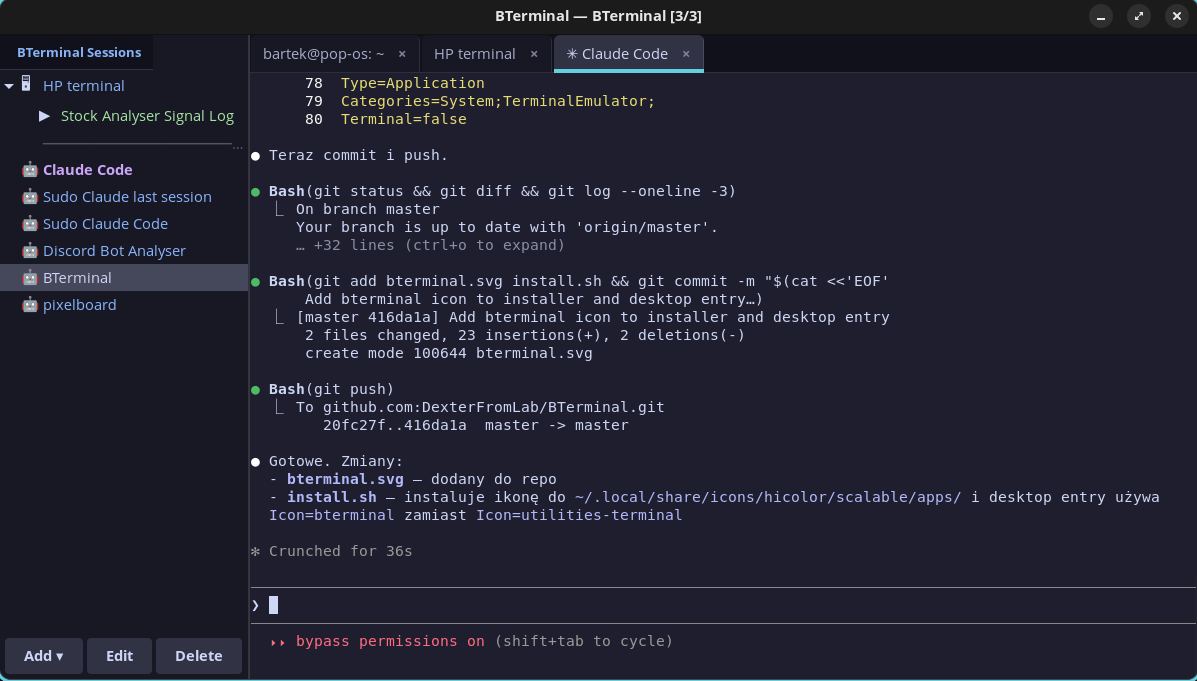
Features
- SSH sessions — saved configs (host, port, user, key, folder, color), CRUD with side panel
- Claude Code sessions — saved Claude Code configs with sudo, resume, skip-permissions and initial prompt
- SSH macros — multi-step macros (text, key, delay) assigned to sessions, run from sidebar
- Tabs — multiple terminals in tabs, Ctrl+T new, Ctrl+Shift+W close, Ctrl+PageUp/Down switch
- Sudo askpass — Claude Code with sudo: password entered once, temporary askpass helper, auto-cleanup
- Folder grouping — SSH and Claude Code sessions can be grouped in folders on the sidebar
- ctx — Context manager — SQLite-based cross-session context database for Claude Code projects
- Catppuccin Mocha — full theme: terminal, sidebar, tabs, session colors
Installation
git clone https://github.com/DexterFromLab/BTerminal.git
cd BTerminal
./install.sh
The installer will:
- Install system dependencies (python3-gi, GTK3, VTE)
- Copy files to
~/.local/share/bterminal/ - Create symlinks:
bterminalandctxin~/.local/bin/ - Initialize context database at
~/.claude-context/context.db - Add desktop entry to application menu
Manual dependency install (Debian/Ubuntu/Pop!_OS)
sudo apt install python3-gi gir1.2-gtk-3.0 gir1.2-vte-2.91
Usage
bterminal
Context Manager (ctx)
ctx is a SQLite-based tool for managing persistent context across Claude Code sessions.
ctx init myproject "Project description" /path/to/project
ctx get myproject                    # Load full context (shared + project)
ctx set myproject key "value"        # Save a context entry
ctx shared set preferences "value"   # Save shared context (available in all projects)
ctx summary myproject "What was done" # Save session summary
ctx search "query"                   # Full-text search across everything
ctx list                             # List all projects
ctx history myproject                # Show session history
ctx --help                           # All commands
Integration with Claude Code
Add a CLAUDE.md to your project root:
On session start, load context:
  ctx get myproject

Save important discoveries: ctx set myproject <key> <value>
Before ending session: ctx summary myproject "<what was done>"
Claude Code reads CLAUDE.md automatically and will maintain the context database.
Configuration
Config files in ~/.config/bterminal/:
| File | Description |
|---|---|
sessions.json |
Saved SSH sessions + macros |
claude_sessions.json |
Saved Claude Code configs |
Context database: ~/.claude-context/context.db
Keyboard Shortcuts
| Shortcut | Action |
|---|---|
Ctrl+T |
New tab (local shell) |
Ctrl+Shift+W |
Close tab |
Ctrl+Shift+C |
Copy |
Ctrl+Shift+V |
Paste |
Ctrl+PageUp/Down |
Previous/next tab |
Documentation
| Document | Description |
|---|---|
| docs/task_plan.md | v2 architecture decisions, error handling, testing strategy |
| docs/phases.md | v2 implementation phases (1-6) with checklists |
| docs/findings.md | Research findings (Agent SDK, Tauri, xterm.js, performance) |
| docs/progress.md | Session-by-session progress log |
License
MIT